
Workman
For the past few years I have been using an alternate keyboard layout as my daily driver. The journey to this stage have not been easy but after around 20+ hours of deliberate practice over the space of 2 months I was able to touch-type comfortably. This post will talk through my experience learning the Workman layout, how it eventually replaced QWERTY and an honest opinion on if its a worthwhile change.
What is Workman?
Workman is an alternative keyboard layout designed by OJ Bucao that focuses on comfort and ergonomics by maximising the usage of keys on the home row and at the same time aimed at reducing lateral movement of fingers and wrists. It comes with some other benefits like low finger travel, balanced left/right hand usage and maximise same hand utilisation.
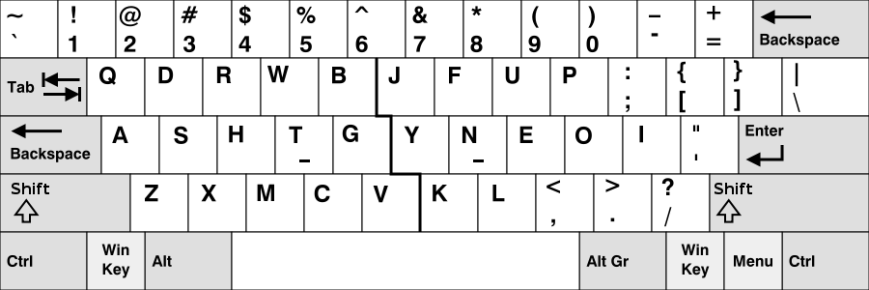
My first real exposure to alternate keyboard format was around 10 years ago where I tried Dvorak, but at the time I really never got the appeal of alternate keyboard layouts and very quickly gave up after 30 minutes. I came across Workman in 2018, at the time I didn’t give it too much attention given how my previous experience with alternate layouts have been. Workman layout showed up again in 2020 on Hacker News and reading thorough some comments I noticed a lot of people recommended alternative keyboard layouts to assist with fatigue and wrist pain (something which has been nagging me recently, and I didn’t want to let it develop to a full on RSI - Repetitive Strain Disorder). With ample time on my hand during the COVID lockdown I decided to bite the bullet and learn Workman.
So how did you go?
So lets start off by saying I am by no mean slow on QWERTY, I average around 95 wpm (words per minute) and max out around 110 wpm for short bursts and this is from years and years of typing, gaming and programming on it. So my confidence in attaining the same typing speed on Workman is rather low from the get go.
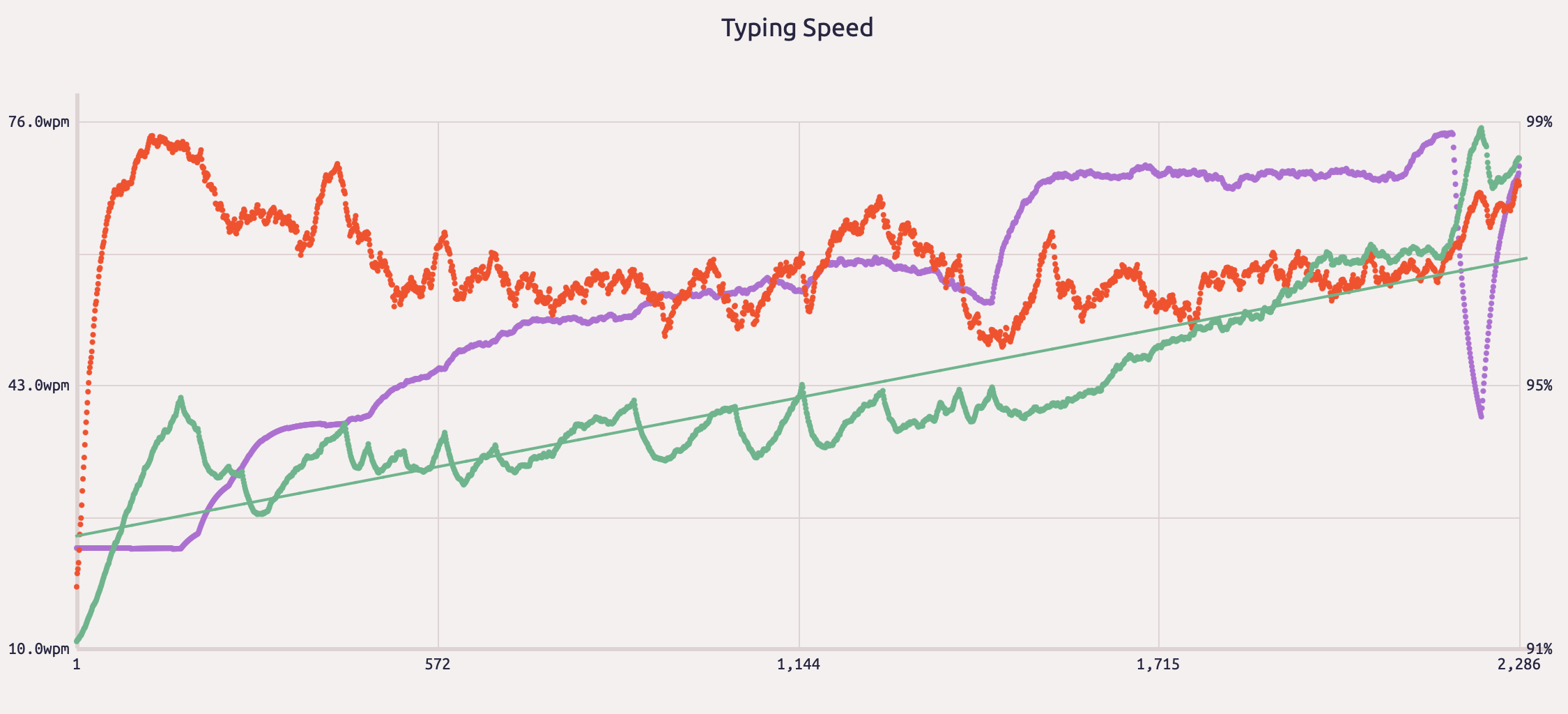
After around 24 hours of deliberate practice, I managed to achieve 60 wpm with a top speed of 75 wpm. It’s important to note I didn’t completely switch over initially so I went back and forth between Workman and Qwerty until I reached around 40 wpm, this is so that I don’t negatively affect my productivity. This probably contributed to my slow progress overall. I have read and seem other people pick up Workman in a much shorter timeframe than I have.
Another thing to note here is that once I was proficient in typing in workman, learning to program on it is a different challenge, shortcuts, macros and keybindings all needed too be either remapped or relearnt.
Why put your self through it?
This started off more of a fun experiment and challenge for myself to learn a keyboard layout, it has been on my todo list for some time. I also saw this as an opportunity to be disciplined about learning something new and build a habit. I set my self a goal of practicing at least 30 minutes a day and initially to build a streak a month. As they say it takes a least 21 days to build a habit.
How did I go about learning it
The best resource for trying and learning new layouts is keybr.com by far. Its good because the lessons goes through every character individually, it only unlock the next character if the previous typing speed target is met. My configuration below.
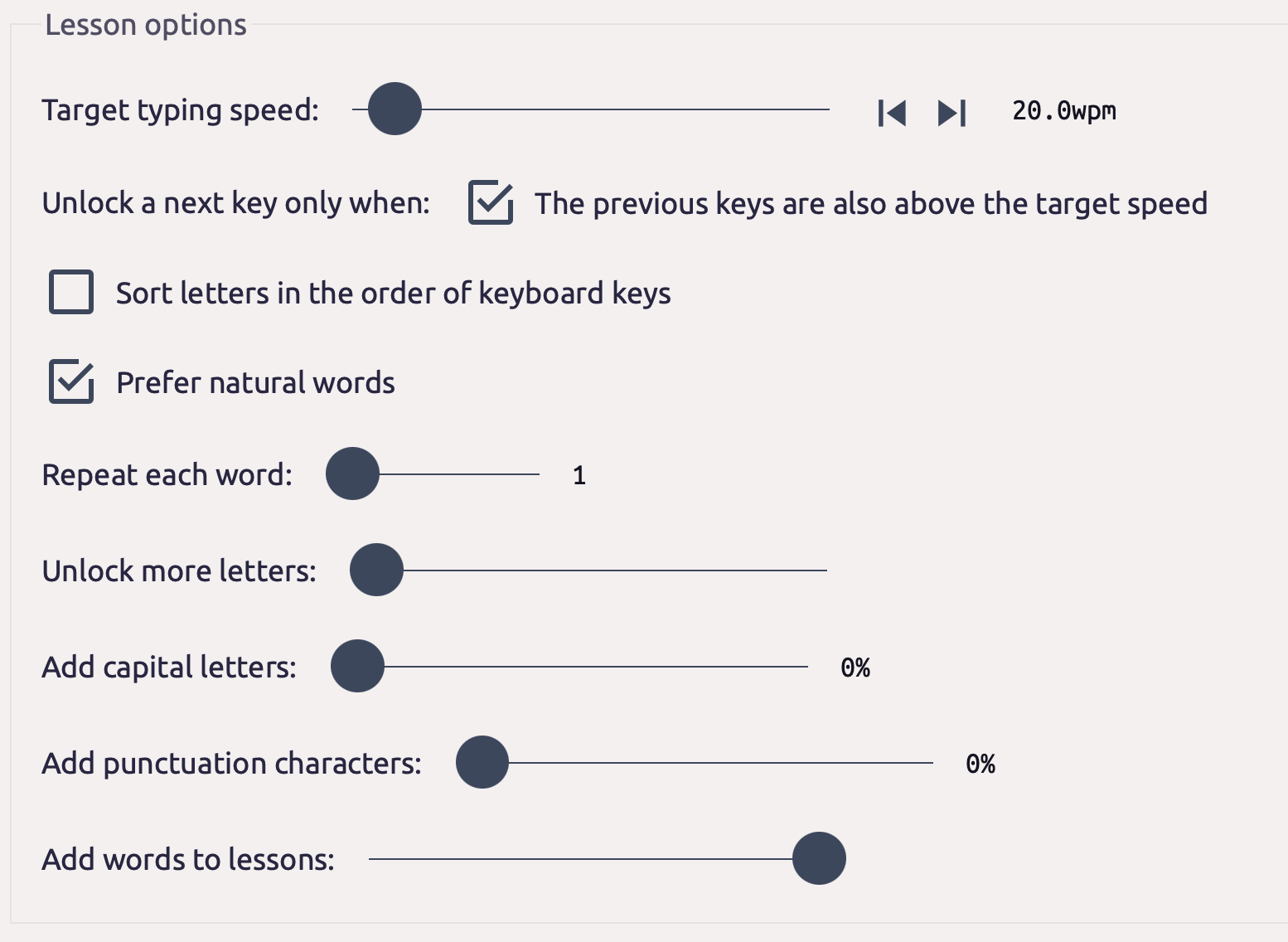
The way I went about it is to set it up is to target 20 wpm per character before unlocking the next, then I switched this up to 35 wpm, followed by 50 wpm. It’s important to note here, learning regression is a thing! Everytime a new key is unlocked, a previously learned key will regress due to muscle memory!
Once I hit about 50 wpm across all the characters, I start shifting over to another website called monkeytype. This is where I spend about 15 minutes a day doing speed drills. MonkeyType doesn’t have lessons but rather it keeps track of your tests by timing how quickly you can type in a set amount of time. I alternate between 30 and 120 second tests. I was able to go from 50 wpm to 75 wpm by doing speed drills, every now and then I still go back to keybr to do a few lessons to get stats on which keys I need to focus on, and redo lessons on those specific characters. The keys I struggled the most with were i/o, c/v, e/f.
But you type slower than before…
While I typed somewhat slower compare to before, my wrist strains have all but gone. I am able to touch-type comfortably for a long period of time. It’s important to note ergonomic != speed. Alternate keyboard layouts puts a lot frequently used keys in easy to reach places, like the home row but the downside of this is that sometimes your fingers are overloaded since it needs to type consecutive characters with the same finger where qwerty doesn’t quite exhibit the same issue for me.
And the verdict?
This is actually a “late-post”, Ive been meaning to write this back in 2024 but I am somehow posting this in 2026. I think workman is a great layout, it has been my daily driver for the past 5 years, it’s honestly a joy to type on once you get over the learning hump. The lateral movement is low and moving your fingers up/down the keyboard feels great.
However earlier this year I have decide to learn a new keyboard layout, Colemak-DH. Why? The main complaint of workman I had was the higher same finger bigrams, I have not been able to type any faster than 80 wpm due to this after 5 years. This lead me down a rabbit hole of alternate layouts once again. I ultimately landed on Colemak-DH. I’m about 15 hours into my journey of learning this new layout. I have only just started using this as my daily driver this week so it probably too early to form any concrete thoughts here but one thing for sure, I’ll be committing to this and come back with another first hand review hopefully quicker than the 5 years it took me to write this post! Till then, thanks for reading!

Have thoughts on this post? Leave a comment